Mentions: you can now name people, and find out when you've been named
Blygger Studio went from 0.54 to 0.56 over three days. The biggest change is @-mentions, so most of this post explains how they work. The rest of the highlights are at the end. Screenshots use an invented writer, Ada Ruiz, and an invented reader, Sam Okafor.
What a mention is
Type @ada while writing. When you publish, it becomes a link to Ada, under the name you gave.
That's most of it. The handle ada is your own shorthand and stays private to you. Readers see "@Ada Ruiz", linked to wherever you said Ada can be found.
A mention notifies nobody. It's closer to writing someone's name with a link than to tagging them on a social network. Nothing is sent to Ada, and no count of mentions exists anywhere.
Adding someone to your address book
Your Studio keeps an address book of people you might mention. There are three ways to add someone.
From something you're reading. This is the easy one. Find a post by the person in your reading feed.
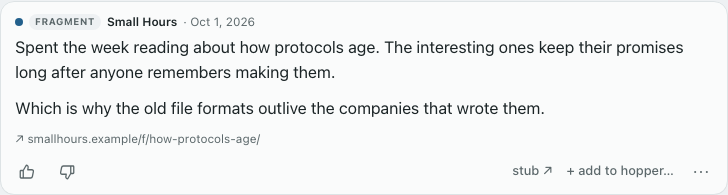
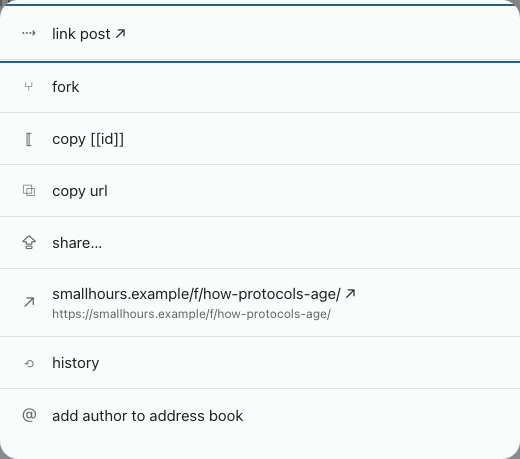
Open its ⋯ menu and choose add author to address book.
The form comes up already filled in with what the post says about its author. Check it, and choose add contact.
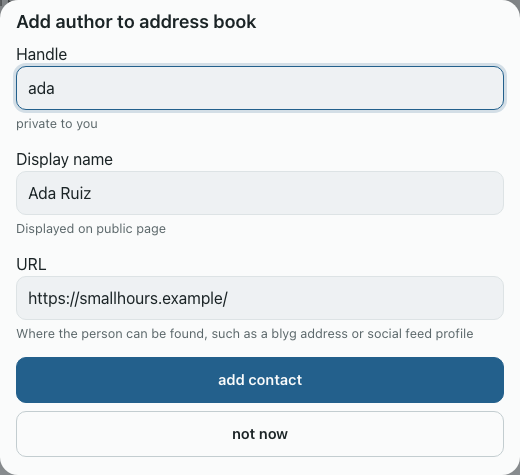
The three fields do different jobs:
- Handle is what you'll type after the
@. It's private to you, so call people whatever you'll remember. - Display name is what readers see on your public page.
- URL is where the link goes. Use wherever the person is best found: their own site or blyg first, a social profile if that's all they have.
When you subscribe. Subscribing to a blyg by hand now offers to add it, in the same sheet, right after you subscribe. Bulk imports don't ask.
By hand. Settings → Address book has the same form.
When you add someone, your Studio also reads the page at that URL for rel="me" links, which is how people list their other accounts. Those travel with the mention, invisibly (more on that below).
Writing one
Type @ and the first letters of a handle or name, and your book offers matches. Press Enter or Tab to take one.
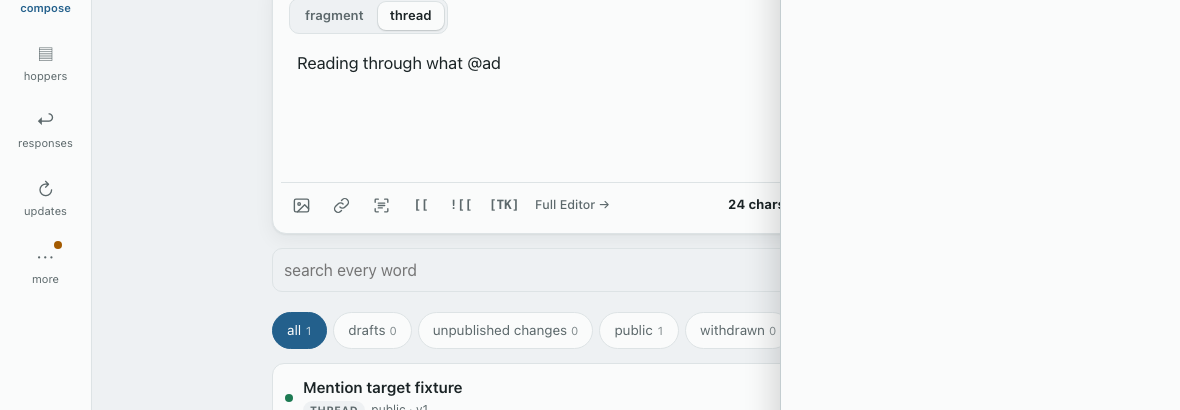
If you type an @word that isn't in your book, it stays as plain text, and the editor warns you with a link to add a contact. An @ in an email address, a code block or a quotation is left alone.
Your draft keeps @ada. The published version gets the link:
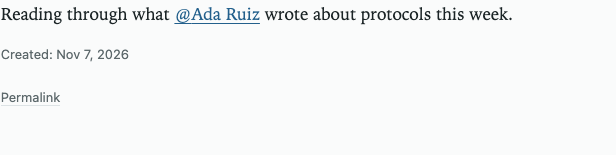
Two things follow from that. If you fix someone's URL, the next version you publish uses the new one, and older versions keep the link they had. And this happens when you publish, so it works the same from the editor, the API or any tool that publishes through your Studio.
Finding out when someone mentions you
Since a mention notifies nobody, how would you ever know? Your own reader can look.
Reading has a new Mentions lens: items you already read that name you, with the mention highlighted and scrolled into view.
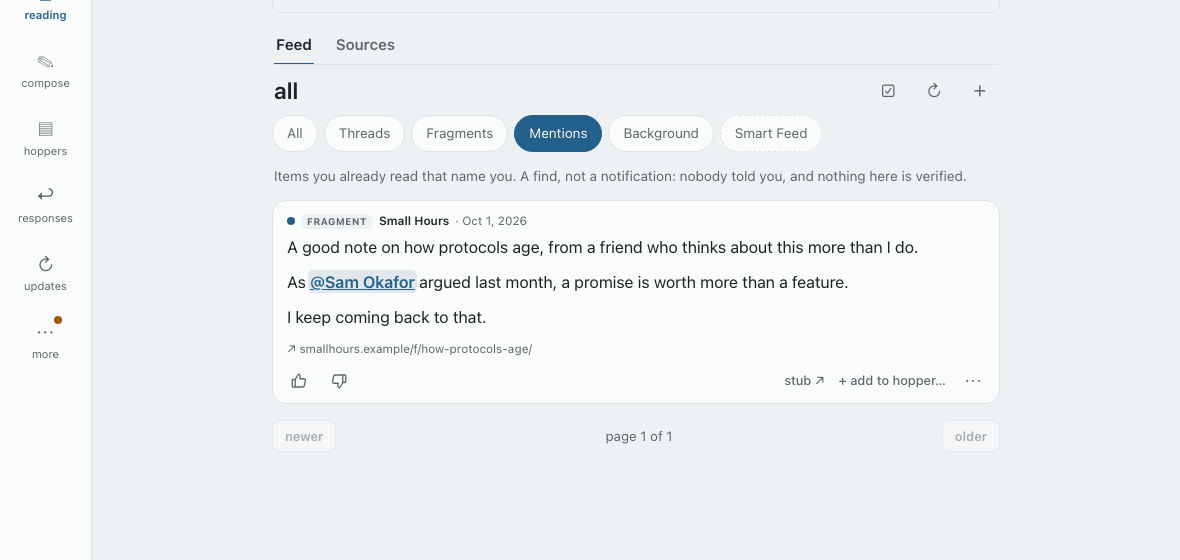
It's a find, not a notification. Nobody told you, and nothing has been verified. Some limits are deliberate:
- Only what you already read. Finding mentions in feeds you don't follow would take someone telling you, which mentions refuse, or a crawler, which is a search engine's job.
- Only the writer's own words. A mention of you inside a post they're quoting belongs to whoever they quoted, and you'll find it when you read that post.
- No tally. "You were mentioned 40 times" is a follower count by another name.
It matches on your author URL and your blyg's own address. So if someone mentions you at an old social profile, it won't find that unless their mention also carries one of those addresses. Listing your accounts with rel="me" on your own page helps with this, because a writer's Studio picks them up when they add you.
Older items you've imported get read in the background, so older mentions show up over a while. Items from legacy RSS feeds aren't included.
A change of words: "responses"
The tab that used to be called mentions is now responses. It lists other posts that stub, quote, fork or link to yours, and it needed a different name now that "mentions" means people. Only the label changed.
For other client authors
A mention is ordinary markup. There's no new protocol field and nothing to implement to keep working. In content_md it's a plain markdown link, and in content_html the same link wrapped in an h-card:
<span class="h-card"><a class="u-url" href="https://smallhours.example/">@<span class="p-name">Ada Ruiz</span></a><data class="u-url" value="did:web:smallhours.example"></data></span>
A reader that knows nothing about h-cards shows a working link. One that does can match the identifiers against its own contacts. Those identifiers are the publisher's claim and prove nothing, so don't merge them into a contact without checking. Item pages are also now microformats2 h-entrys, with the author as a hidden p-author h-card.
The reasoning is in TN-6. This started as RFC-1, and the comment period changed it: Mike Casey's question is why handles resolve on the server for every tool, and Aneesh Sathe's is why the Mentions lens exists.
The other highlights
In the editors
- Fragment mode is easier to notice: the box has a light tint, and thread-only tools are greyed out instead of disappearing.
- The character count is bolder, appears in quick edit too, and goes red with the text past 1000 in a fragment.
- Cmd/Ctrl+B, I and K make bold, italics and a link.
- In the full editor, the text box and the preview start level, and quotes in the preview look as they do on your public page.
Elsewhere
- A
word-countextension shows word counts in the reader, with totals for a contents thread. Operators compile it in, and owners turn it on in Settings. - The address book section in Settings has its own form and help text.
- The hopper picker no longer comes up empty if you open it before the list has loaded (Kyle Mathews).
Each release has its own announcement on this blyg with full notes.
Upgrading: 0.56.0 needs migrations 0042 and 0043, applied before you deploy.